Localizations
It is possible to provide additional translations for the game. The strings are stored in precompiled .mo libraries. A locale is defined by a .lang.lua file with some meta information:
function data()
return {
  name = "German",
  locale = "de_CH",
  fontMap = {
    regular = "Lato2OFL/Lato-Regular.ttf",
    bold = "Lato2OFL/Lato-Bold.ttf",
    light = "Lato2OFL/Lato-Light.ttf",
    medium = "Lato2OFL/Lato-Medium.ttf",
    monoRegular = "Noto/NotoSansMono-Regular.ttf",
    monoBold = "Noto/NotoSansMono-Bold.ttf",
  },
  unicodeFontMap = {
    regular = "Noto/NotoSansCJKsc-Regular.otf",
    bold = "Noto/NotoSansCJKsc-Bold.otf",
    monoRegular = "Noto/NotoSansMonoCJKsc-Regular.otf",
    monoBold = "Noto/NotoSansMonoCJKsc-Bold.otf",
    scaling = 0.9,
  },
}
end
The properties are:
nameis the string that is displayed in the settings menu to select the language.localeis the identifier that can be used by other mods to provide compatible translations. In addition, it is used to select the right format for numbers (e.g. decimal point). The locale identifier consist of<language>_<region>where<language>is a two letter ISO 639-1 code and<region>is an optional two letter ISO 3166-1 code for the region. For exampledeis the general German and fallback for all other german translations whilede_CHis Swiss German andde_ATis Austrian German.fontMapis a mapping of font types for the regular text display in the game.unicodeFontMapis a mapping of font types for the regular text display in the game.
In the strings/ folder, there has to be a folder with the name being the locale identifier. It contains a LC_MESSAGES folder which contains the base.mo file with all the localized strings.
Translation
The translation is a three step process:
- Decompiling the
.mofiles to.pofiles that are editable - Editing the translation
- Compiling the
.pofiles to.mofiles that are usable by the game
Decompiling
To start a new translation, it's recommend to base on the default translation. There are some tools that can be used to decompile the .mo files:
- polib is a python based script library.
- Poedit is a software to edit
.pofiles that comes with a tool to convert the files.
To convert with that tool, install Poedit. Then you can find a msgunfmt.exe in the installation subfolder Poedit/GettextTools/bin/. Execute path/to/msgunfmt.exe "path/to/xyz.mo" -o "path/to/xyz.po" in a command line interface to convert the file.
Editing
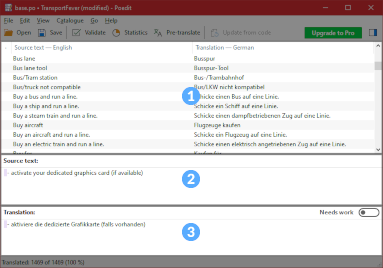
The .po file can be opened by any text editor. For more convenience, programs like Poedit itself can be used to edit the files.
Make sure to set the correct target language. This can be done in Catalogue > Properties at the Language dropdown.
The editor consists of three big areas:
- The list at the top contains all source and target strings 1. The source strings usually are in english or they are unique keys.
- The second area contains the source text of the currently selected item 2. Do not modify them!
- The third area contains the translated text 3. Here you can edit the text. Some texts contain functional elements like
%1%or{townName}. They are replaced by some numbers or names ingame. Try to use them equally in the translation too. Some source strings come with different forms for singular and plural. Don't forget to translate all versions that are shown under small tabs.
Compiling
Once the translation should be compiled, either use Poedit File > Compile to MO… or execute path/to/msgunfmt.exe "path/to/xyz.po" -o "path/to/xyz.mo" in a command line interface to convert the file into .mo format.
Updating
With new game releases, there may come new strings too. You can use Poedit to merge new key strings from an updated PO file into yours. Select Catalog > Update from POT file from the menu.
Support Additional Languages in Mods
To support additional languages in mods, simply add another struct with the identifier from the locale property in the strings.json as described here.