Traffic Lights
Traffic lights are used at urban street intersections. They are visual indicators of the traffic control regulations.
Configuration
Traffic lights are configurated in a .trl.lua file. It's content is:
function data()
  return {
    description = {
      name = _("Traffic Light"),
      icon = "traffic_light_a_eu.tga",
    },
    availability = {
      yearFrom = 1950,
      yearTo = 1990,
    },
    menuCategory = {
      categories = {
        {
          filterCategories = {"special"},
          order = 5000,
        },
      },
    },
    categoryList = {
      categories = {
        "temperate.clima", "subarctic.clima"
      },
    },
    tryOpposite = true,
    modelScript = {
      fileName = "traffic_light.script@traffic_light_a.modelFn",
      params = {...}
    },
  }
end
The description struct contains:
nameis the name of the traffic light type. It can be translated in a strings.json file.descriptionis the description tooltip. It can be translated in a strings.json file.iconis a reference to a ui@2x.tgaicon with a resolution of 120x76 pixels.
The availability range is set with:
yearFromis the year from when the traffic light should be available. Unset or values below 1901 mean from start.yearTois the year until when the traffic light should be available. Unset or value 0 means unlimited availability, values below 1900 result in a never available railroad crossing.
The menuCategory is used to define the filter categories and order. See the construction menu for more details about them.
The categoryList.categories list contains tags that are used in the terrain generation process and climate filtering. Entries that equal the filename of a climate are used to assign the model to a certain climate. It will not be available in other climates.
With the boolean property tryOpposite it is possible to set a traffic light type to try building it on the opposite side of the intersection, like it is common in the USA. If there is no opposite street, the lights are placed before the intersection as if tryOpposite would be false.
The logic function for the model placement is referenced with the modelScript script reference. See below.
Model Script
The function referenced as modelScript is called for every street of an intersection and receives two parameters:
captureParamswith the additional parameter data provided next to the script reference.argswith the game data describing the relevant data of the street for the intersection that shall be built.
The content of the args struct is:
| key | type | description |
|---|---|---|
needsLight | list of boolean | from right to left true for every lane that needs a light, including sidewalk lanes false for every lane that needs no light at that position. |
pedestrian | list of boolean | type of lane from right to left true for every sidewalk lane false for ever car lane |
position | transf | reference position at the right side of the street next to the outermost lane |
widths | list of float | the width of each lane including sidewalks from right to left |
oppositePosition | transf | reference position if the location is behind the intersection instead of before the intersection. |
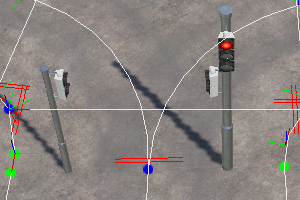
The expected return data struct contains a list with n nested lists where n is the number of lanes with needsLight == true. Each of the nested lists contains pairs with id and transf where
idis the reference to a.mdlfile.transfis the global transformation matrix for this model.
An exemplaric result data struct for a one-way street with one car lane could look like this:
{
  { -- sidewalk right
    { id = "traffic_light_eu_c/pedestrian_light.mdl", transf = { ... } }
  },
  { --car lane
    { id = "traffic_light_eu_c/traffic_light_1.mdl", transf = { ... } },
    { id = "traffic_light_eu_c/pole.mdl", transf = { ... } }
  },
  { --sidewalk left
    { id = "traffic_light_eu_c/pedestrian_light.mdl", transf = { ... } },
    { id = "traffic_light_eu_c/pedestrian_pole.mdl", transf = { ... } }
  }
}
Trafficlightutil.lua
There is a prebuilt modelFn function available in the res/scripts/trafficlightutil.lua script. It requires a data struct with several properties being provided as capturedParams to the modelScript:
local input = {
  models = {
    trafficLightPole = "traffic_light_us_c/pole.mdl",
    pedestrianPole = "traffic_light_us_c/pedestrian_pole.mdl",
    beam = {
      "traffic_light_us_c/beam_1.mdl",
      "traffic_light_us_c/beam_2.mdl",
      "traffic_light_us_c/beam_r.mdl",
      -- last model is repeated
    },
    trafficLight = {
      "traffic_light_us_c/traffic_light_1.mdl",
      "traffic_light_us_c/traffic_light_r.mdl",
      -- last model is repeated
    },
    pedestrianLight = "street/traffic_light_us_c/pedestrian_light.mdl",
  },
  params = {
    offset = -0.25,
    beamWidth = { 4 + .25, 4, 4 }, -- on model repetition last entry is used
    lightOffset = { 2, 2 }, -- offset is relative to beam -- on model repetition last entry is used
    poleTrafficLight = false
  }
}
The models that should be used by the script are provided in the models struct:
trafficLightPoleis the pole model for traffic lights and pedestriant lights on the right side of the car lanes.pedestrianPoleis the pole model for pedestriant lights where they are not attached to a traffic light pole, e.g. on the left side of the street.beamis a list of beam models. The first one is used on the right, usually to extend the traffic light pole. The last one is repeated if needed.trafficLightis a list of trafficLight models. The first one is used on the right side. The last one is repeated if needed.pedestrianLightis the model for the pedestrian lights.
Additional parameters are provided in the params struct:
offsetis a offset orthogonal to street direction.beamWidthis a list of n floats where n is the number of entries in thebeamlist above. Each value is the width of the respective beam model.lightOffsetis a list of offsets from the mid of the lane in orthogonal direction for each traffic light from thetrafficLightlist above.poleTrafficLightis a boolean option that determines if the traffic light of the rightmost lane should be mounted at the traffic pole instead of the beam above.
Traffic light models
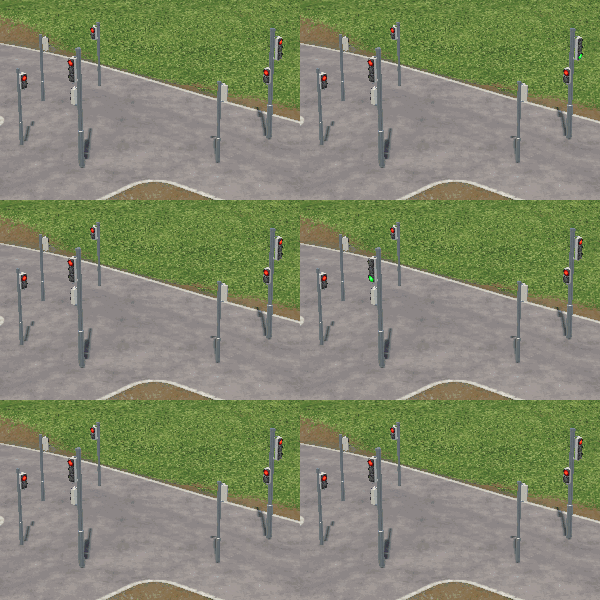
The traffic light models as well as the pedestrian light models can use the following events:
idle_redanimation is used as a loop while the light is in 'red' state.greenanimation is used when the light switches from 'red' to 'green'.idle_greenanimation is used as a loop while the light is in 'green' state.redanimation is used when the light switches from 'green' to 'red'.
Usually a traffic light is in red state and the idle_red animation is performed. As soon as it switches to green, green is performed once. Then idle_green is looped as long as the traffic light stays green. When the traffic light turns back to red, red is performed once before idle_red is looped again.
The idle animations can be used e.g. for blinking traffic lights.