Bridges and Tunnels
Bridges and tunnels for streets and tracks are defined with config files too.
Bridges
A bridge configuration files specifies a set of parameters to define the properties, dimension, features, and visuals of bridges. They are stored in .bridge.lua filesand have the following format:
function data()
return {
  -- property definitions

  materialsToReplace = { ... },
  assetsToReplace = { ... },

  updateScript = {...}
}
end
Property Definitions
The bridge properties start with the common metadata properties:
  description = {
    name = _("Stone bridge"),
    icon = "stone.tga",
  },
  availability = {
    yearFrom = 0,
    yearTo = 0,
  },
  menuCategory = {
    categories = {
      {
        filterCategories = {"special"},
        order = 5000,
      },
    },
  },

  cost = 200.0,
  maintenanceCost = 10.0,
  costFactors = { 10.0, 2.5, 1.0 },

  carriers = { "RAIL" , "ROAD"},
  speedLimit = 90.0 / 3.6,
  isAutoSelectable = true,
Their meaning is as follows:
descriptioncontains two properties:nameis the name of the bridge type. It can be translated in a strings.json file.descriptionis the description tooltip. It can be translated in a strings.json file.iconis a reference to a small@2x.tgaicon which has a resolution of 120×76 pixels shown in the menu when bridge types can be selected.
availabilitycontainsyearFromis the year from when the bridge should be available. Unset or values below 1901 mean from start.yearTois the year until when the bridge should be available. Unset or value 0 means unlimited availability, values below 1900 result in a never available bridge.
menuCategoryis used to define the filter categories and order. See the construction menu for more details about them.costis the building cost coefficient. The costs of the bridge itself are calculated by multiplying this value with the area below the bridge. In addition the street or track on top has its own cost.maintenanceCostis the monthly billed cost coefficient. The maintenance costs of the bridge itself are calculated by multiplying this value with the area below the bridge. In addition the street or track on top has its own cost.costFactorsare three additional coefficients that are used to calculate the area below the bridge. For every ~5m along the bridge, the height difference to the ground is measured and the resulting area for that step is calculated with:5 * (a * heightDiff ^ b + c)where a is1 / (costFactors[1] ^ costFactors[2]), b iscostFactors[2]and c iscostFactors[3].carriersis a list of carrier keys to define if bridges should be available for"RAIL"and/or"ROAD".speedLimitis the maximum speed in meter per second. If the track or street has a lower speed restriction, the bridge speed limit is ignored.isAutoSelectableis a boolean flag used to prevent some special bridge types from being automatically selected when building roads or tracks. If unset, it is considered astrue.
There are several properties available to control the pillars:
  pillarLen = 3,
  pillarWidth = 5,

  pillarMinDist = 12.0,
  pillarMaxDist = 48.0,
  pillarTargetDist = 12.0,
  ignoreWaterCollision = false,

  pillarGroundTexture = "/terrain/materials/dirt/dirt.gtex",
  pillarGroundTextureOffset = 10.0,

  abutmentLen = 3,
  abutmentWidth = 4,

  noParallelStripSubdivision = false,
  autoGeneration = false,
pillarLenis the length of pillar on ground level that is used for collision calculation and ground texture.pillarWidthis the width of pillar on ground level that is used for collision calculation and ground texture.pillarMinDistis the minimum distance between 2 pillars.pillarMaxDistis the maximum distance between 2 pillars.pillarTargetDistis the optimum distance between 2 pillars that is used as default.ignoreWaterCollisionis a boolean flag that will encourage equally spread pillars even if it results in them being in the water. When set tofalse, the pillars are preferably build on land.pillarGroundTextureis a reference to a ground texture that should be used around the pillars.pillarGroundTextureOffsetis a distance which is added to all sides of the pillar in which the pillar ground texture is used too.abutmentLenis the length of abutments on track/street level that is used for height, collision calculation and ground texture.abutmentWidthis the width of abutments on track/street level that is used for height, collision calculation and ground texture.
Another property is noParallelStripSubdivision. If it is set to true, the updateFn will be called for the whole bridge instead of seperate segements. Be aware that bridge segments are limited to a length of 100 meters, so this property might be relevant for bridges with large gaps between pillars. If set to false or the property is unset, the updateScript will be called several times. Larger pillar distances then will result in no pillars.
To prevent bridge types from being used during map generation and automated spawning of new roads, the autoGeneration flag can be set to false.
Material & Assets Override
 ballast material is replaced
To adjust the optics of the street or track on the bridge, it is possible to override materials and assets as well as the sidewalkHeight.
The materialsToReplace list is used to overwrite materials defined in the street and track configuration. See there for further details on the purposes of the different types.
The assetsToReplace list allows removing or replacing materials:
assetsToReplace = {
  ["street_light"] = {
    name = "/assets/streets/street_light_eu_b.mdl",
    offset = 8.0,
    distance = 16.0,
    prob = 1.0,
    offsetOrth = 3.0,
    randRot = false,
    oneSideOnly = false,
    alignToElevation = false,
    avoidFaceEdges = false,
  },
  ["fireplug"] = { },
The keys of the struct need to be the same as used in the .street.lua. If an empts list is assigned to a key (as in the fireplug entry), the asset will be skipped completely.
Update Script
The updateScript references a function in a .script.lua file that is used to construct the bridge from individual model parts. It is common to forward some metadata next to the reference which is then available as captureParams in the function.
When called, the update function receives the mentioned captureParams and a second set of params containing the bridge configuration that shall be built. It has the following values:
pillarHeightscontains a list with the heights of all the pillars.pillarWidthis the width of a pillar.pillarLengthis the length of a pillar.railingWidthis the width of the bridge.railingIntervalsis list of bridge parts between the pillars. There are six properties for each section:curvatureis the inversion of the radius in this railing section (1/radius).hasPillaris a pair of two values that are the ids of the pillars at the start and end of the railing section.-1tells that it is the start or end of the whole bridge part that is built with theupdateFncall.lanesis a list of lanes that are built with the bridge. For streets and single tracks, there is only one entry in the list but for parallel tracks, there is an entry for each track. Each entry has two properties:offsetis the orthogonal offset from the bridge center lane. For tracks this is usually a multiple of 5.typeis the collision type of this particular lane, see below.
lengthis the length of the railing section between the pillars.
hasAbutmentis a pair of boolean values, describing if there is an abutment at the start and/or end of the bridge segment.abutmentHeightis a pair of numbers providing info about the needed height for the abutments.beginNeedEntryis a boolean value describing if the bridge has a transition from land at the start of the segment.endNeedEntryis a boolean value describing if the bridge has a transition to land at the end of the segment.
The collision types that can be used to prevent railings are:
0no collision1collision on the left (in the dragging direction)2collision on the right (in the dragging direction)3collision on both sides
It is expected that the result contains two lists:
result.pillarModelsis a list of pillars and abutments. Each element of the list corresponds to one of theparams.pillarHeightsentries and after that the start and end abutments if needed. The elements are lists themselves containing all the rows of models for each pillar.result.railingModelsis a list of railing sections. Each element of the list corresponds to one of theparams.railingIntervalsentries, thus both lists have the same length. The elements are lists themselves containing all the rows of models for each railing section.
return {
  pillarModels = {
    { -- pillar 1
      { -- row 1
        { id = "bridge/stone/pillar_btm_side.mdl", transf = { ... } },
        { id = "bridge/stone/pillar_btm_rep.mdl", transf = { ... } },
        { id = "bridge/stone/pillar_btm_side2.mdl", transf = { ... } },
      },
      ... -- more rows
    },
    ... -- more pillars and abutments if needed
  },
  railingModels = {
    { -- section 1
      { -- row 1
        { id = "bridge/stone/railing_end_side.mdl", transf = { ... } },
        { id = "bridge/stone/railing_end_rep.mdl", transf = { ... } },
        { id = "bridge/stone/railing_end_rep.mdl", transf = { ... } },
      },
      ... -- more rows
    },
    ... -- more sections
  },
}
Bridge Util
To ease the configuration of simple bridges, the /infrastructure/bridges/bridgeutil2.lua offers a prefabricated update function makeDefaultUpdateFn, which is also used by several of the vanilla bridges. This function gets a config struct as captureParams. The contents of this struct are described below.
Each model reference in the next sections is actually a struct of the following structure:
{
  "/infrastructure/bridge/steel/b_12_end_rep_l.mdl",
  { { 0, -1.6, -1.7 }, { 12, 0, 9 } },
}
The first entry in the struct is the actual reference of a model and the second entry is the bounding box data of the model.
Pillars
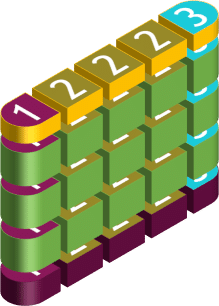
Bridge pillars consist of three mandatory layers, of which the middle layer can be repeated several times:
pillarTop(yellow) is a list of models used for the upper end of the pillar.pillarRepeat(green) is a list of models used for the height variable part of the pillar. These models are put together vertically several times and, if necessary, scaled slightly to reach the required height.pillarBase(purple) is a list of models that are used for the bottom layer of the pillar that touches the ground.
An additional pillarMain layer list can be added that is used on top of the pillarTop layer and above the track or street bed.
All four lists may vary in length. Possible lengths are:
| 1 model reference |  | This model is set in the middle as a pillar. |
| 2 model references |  | The first model is used for the edges of the pillar (rotated once accordingly), the second model is placed next to each other for the middle of the pillar and scaled slightly until it fills the required width. |
| 3 model references |  | The first model is used for one side of the pillar, the second model is placed next to each other for the middle of the pillar and scaled slightly until it fills the required width and the third model is used for the other side, but not rotated. |
Abutments
Bridge abutments are defined in a similar way as the pillars. They consist of three mandatory layers, of which the middle layer can be repeated several times:
abutmentTop(yellow) is a list of models used for the upper end of the abutment.abutmentRepeat(green) is a list of models used for the height variable part of the abutment. These models are put together vertically several times and, if necessary, scaled slightly to reach the required height.abutmentBase(purple) is a list of models that are used for the bottom layer of the abutment that touches the ground.
All three lists may vary in length like the ones of the pillars.
Railings

The bridge railing also consists of several rows that are placed next to each other:
railingBegin(purple) is a list of models that are used for the beginning of a bridge railing segment. A railing segment starts at the beginning of the bridge and at each pillar.railingRepeat(green) is a list of models that are used for the center of a bridge girder segment. These models are lined up horizontally several times and, if necessary, scaled slightly to reach the required length.railingEnd(yellow) is a list of models that are used for the end of a bridge railing segment.
All three lists may vary in length. There can be either 5 or 8 models in the list. If only 5 elements are included, the elements 1-3 are used as a substitute for 6-8 in a rotated version. The purpose of the elements are:
- side element
- side element with no roof because of a collision on the other side
- side element with no railing and roof because of a colission on this side, e.g. a track switch
- middle element (that is repeated to fill the bridge width)
- middle element with no roof because of a collision on at least one of the sides
- other side element
- other side element with no roof because of a collision on the other side
- other side element with no railing and roof because of a colission on this side
Other Parameters
There are additional parameters for bridge configurations:
alwaysAddRailingBeginEndforces the railing to start/end at the segment ends even though there is no pillar.minIntervalLengthallows setting a threshold length in meter under which the segments are not considered to have roofs.
Tunnels
A tunnel configuration files specifies a set of parameters to define the properties, dimension, features, and visuals of tracks. They are stored in .tunnel.lua files.
Configuration
The file has the following format:
function data()
return {
  description = {
    name = _("Standard tunnel"),
    icon = "tunnel_a.tga",
  },
  availability = {
    yearFrom = 0,
    yearTo = 1950,
  },
  menuCategory = {
    categories = {
      {
        filterCategories = {"special"},
        order = 5000,
      },
    },
  },

  cost = 200.0,
  maintenanceCost = 10.0,
  costFactors = { 10.0, 2.5, 1.0 },

  carriers = { "RAIL" , "ROAD"},

  padding = 2,
  height = 10.03,

  updateScript = {
    fileName = "tunnel.script@tunnel.updateFn",
    params = config
  },
}
end
Many properties are the same as for the bridges. Their meaning is as follows:
descriptioncontains two properties:nameis the name of the tunnel type. It can be translated in a strings.json file.descriptionis the description tooltip. It can be translated in a strings.json file.iconis a reference to a small@2x.tgaicon which has a resolution of 120×76 pixels shown in the menu when tunnel types can be selected.
availabilitycontainsyearFromis the year from when the tunnel should be available. Unset or values below 1901 mean from start.yearTois the year until when the tunnel should be available. Unset or value 0 means unlimited availability, values below 1900 result in a never available tunnel.
menuCategoryis used to define the filter categories and order. See the construction menu for more details about them.costis the building cost coefficient. The costs of the tunnel itself is calculated by multiplying this value with the area of the tunnel. In addition the street or track inside has its own cost.maintenanceCostis the monthly billed cost coefficient. The maintenance costs of the tunnel itself are calculated by multiplying this value with the area of the tunnel. In addition the street or track inside has its own cost.costFactorsare three additional coefficients that are used to calculate the in the tunnel. For every ~5m along the tunnel, the height difference to the ground is measured and the resulting area for that step is calculated with:5 * (a * heightDiff ^ b + c)where a is1 / (costFactors[1] ^ costFactors[2]), b iscostFactors[2]and c iscostFactors[3].carriersis a list of carrier keys to define if tunnels should be available for"RAIL"and/or"ROAD".
It is also possible to overwrite materials and assets as described for bridges above.
Additionally there are functional properties specifically for tunnels. The padding describes the offset from the side of the outer lanes to the walls. It is used to calculate the split point of tunnels with diverging tracks/roads. The height defines the minimum height of the terrain at the position of the tunnel. It is not possible to lower terrain above the tunnel lower than that with terrain tools.
Update Script
The updateScript references a function in a .script.lua file that is used to construct the tunnel from individual model parts. It is common to forward some metadata next to the reference which is then available as captureParams in the function.
When called, the update function receives the mentioned captureParams and a second set of params containing the bridge configuration that shall be built. The params are the same as described for bridges above. There are two properties in the railingIntervals for tunnels:
beginDeadEndIntervalsdescribes the front wall of the tunnel segment begin if there is a dead ending lane. It is described from the left wall end of the segment.endDeadEndIntervalsdescribes the end wall of the tunnel segment end if there is a dead ending lane. It is described from the right wall end of the segment.
It is expected that the result contains a result.railingModels list. Each element of the list corresponds to one of the params.railingIntervals entries, thus both lists have the same length. The elements are lists themselves containing all the rows of models for each railing section.
Default Update Script
The vanilla tunnels use the script in content/infrastructure/tunnel/tunnel.script.lua@tunnel. It expects a config struct as captureParams:
updateScript = {
  fileName = "tunnel.script@tunnel.updateFn",
  params = {
    railingBegin = { ... },
    railingRepeat = { ... },
    railingEnd = { ... },
    portalsConfig = { tunnel_a_startportal_rgt, tunnel_a_startportal_rep, tunnel_a_startportal_lft },
    endPortalsConfig = { tunnel_a_endportal_rgt, tunnel_a_endportal_rep, tunnel_a_endportal_lft },
    deadConfig = { tunnel_a_dead_rgt, tunnel_a_dead_rep, tunnel_a_dead_lft, tunnel_a_dead_rgt_end, tunnel_a_dead_lft_end },
    assetsConfig = {
      { tunnel_a_m1_side_lft[1], tunnel_a_m1_add_lamp_lft1[1], 15, 3},
      { tunnel_a_m1_side_rgt[1], tunnel_a_m1_add_lamp_rgt1[1], 20, 5},
      { tunnel_a_m1_side_lft[1], tunnel_a_m1_add_lamp_lft2[1], 13, 0},
      { tunnel_a_m1_side_rgt[1], tunnel_a_m1_add_lamp_rgt2[1], 16, 0},
    }
  }
}
Here the properties are the following:
railingBeginis a list of 5 or 8 models for segment starts as described for the bridges above.railingRepeatis a list of 5 or 8 models for repeating parts of segments as described for the bridges above.railingEndis a list of 5 or 8 models for segment ends as described for the bridges above.portalsConfigis a list of 3 models used for the portal at the start of the tunnel. The models are used as right side, repeating and left side model.endPortalsConfigis a list of 3 models used for the portal at the end of the tunnel. The models are used as right side, repeating and left side model.deadConfigis a list of 5 models used for dead ends of tracks in tunnels. The models are used as:- right side of the dead end.
- repeating part of a dead end.
- left side of a dead end.
- corner where there is a dead end on the right and the tunnel continues on the left.
- corner where there is a dead end on the left and the tunnel continues on the right.
assetConfigis a list of asset configurations. Each entry has:- a reference to a
.mdlfile to which the asset shall be added. - a reference to a
.mdlfile for the asset. - an interval number to attach the asset every n instances of the parent
.mdl - an offset to start at the nth instance of the parent
.mdl