Mod Parameters and Scripts
Mods may have parameters to customize the user experience depending on the user preferences. The selected parameters can be used in the scripts that each mod can provide.
Mod Params
Mods can provide individual parameters in the params property. These use the parameter types that are available for constructions too. The user can select his preferences in the mod selection when creating a new game or loading an existing savegame. Parameters of all mods are available in the script functions described below.
{
    ...
    "params": [
        {
            "key": "param_key",
            "name": "Parametername",
            "tooltip": "Parameter-Tooltip",
            "uiType": "ComboBox",
            "values": [
                "Era A",
                "Era B",
                "Era C"
            ],
            "numbers": [1, 2, 3],
            "defaultIndex": 2
        },
        ...
    ],
    ...
}
Each parameter has several properties:
keyis a string that is used to reference this parameter in functions.nameis the string that is shown in the ui.tooltipis an optional string that is displayed when the user moves to mouse over the name of the parameter.uiTypeis used to select the type of parameter. It is eitherButton,Slider,ComboBox,IconButtonorCheckBox.valuesis either a list of filepaths in case ofIconButtonparameters or a list of strings for all other types.numbersis an optional list of doubles that are returned when referencing the parameters in script functions. If unset, the default values are 1, 2, 3, …defaultIndexis an optional integer to specify the default option of the parameter. If unset, the first one is used.
While indices in lua and Teal files are 1-based, the defaultIndex in the mod.json needs to be set 0-based.
Script Functions
The static mod.json does not contain executable functions itself, but it may reference a .script.lua file for these functions:
{
    ...
    "preRunScript": {
        "fileName": "ug_wiki_example_mod::mod.script@preRunFn"
    },
    "runScript": {
        "fileName": "ug_wiki_example_mod::mod.script@runFn"
    },
    "postRunScript": {
        "fileName": "ug_wiki_example_mod::mod.script@postRunFn"
    },
    ...
}
The functions can be referenced with <modid>::<filename>@<functionname>. There are three different functions that can be specified for each mod. The base game functions are executed first, then in the order of mod activation:
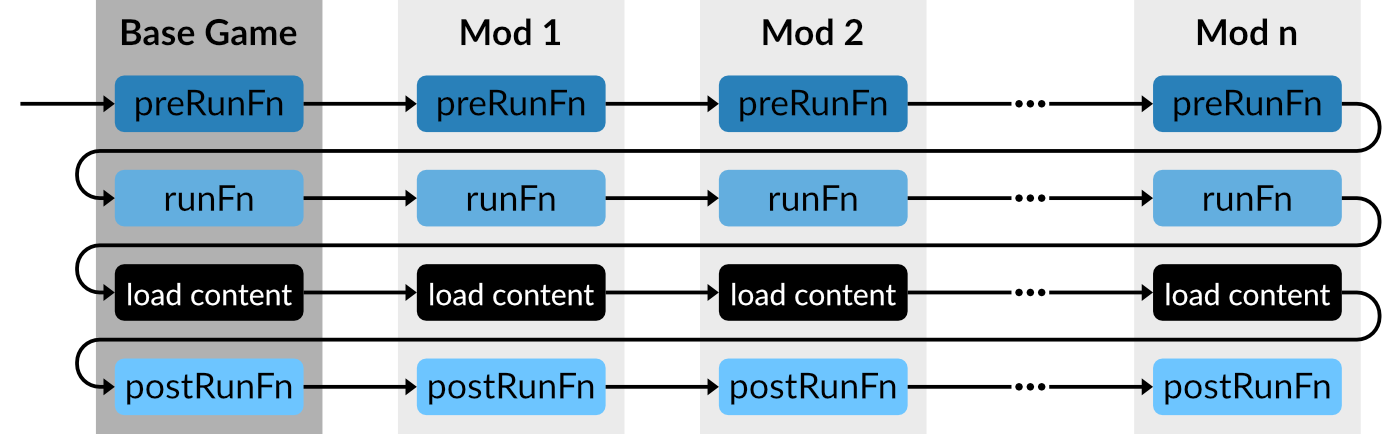
preRunScript
The preRunScript function is called before the game and mod resources are loaded. It receives three parameters:
configDictcontaining the selected climate, economy and name list.allModParamscontaining a list of all mod parameters with the mod id as key of the list items. To retrieve the list of parameters for the current mod,allModParams[getCurrentModId()]can be used.baseConfiga list of all properties that are relevant for the simulation and gameplay aspects.
The preRunFn allows the adjustment of this baseConfig by overriding the individual values. See game configs for a detailed list of all existing configuration properties in the base config.
runScript
The main function that is called when a mod is loaded is the runScript function. It receives two parameters:
configDictcontaining the selected climate, economy and name list.allModParamscontaining a list of all mod parameters with the mod id as key of the list items. To retrieve the list of parameters for the current mod,allModParams[getCurrentModId()]can be used.
It is possible to register file filters and resource modifiers that are considered when loading the game resources after all the runFn are executed. However it is recommended to filter and alter resources in the postRunFn whenever that is possible. See resource modifiers and file filters for the filters and modifiers and below for the postRunFn.
postRunScript
The postRunScript function is called once after all resources are loaded. It receives two parameters:
configDictcontaining the selected climate, economy and name list.allModParamscontaining a list of all mod parameters with the mod id as key of the list items. To retrieve the list of parameters for the current mod,allModParams[getCurrentModId()]can be used.
It is possible to use the api.res.* script functions provided by the Scripting API, e.g. to add additional multiple unit configurations or construction modules based on the loaded resources.
Resource Filtering
This example has a mod parameter that allows optional filtering of models. It is available for download.
Explanation
The parameter is defined in the mod.json:
...
    "params": [
        {
            "key": "paramVehicleFilter",
            "name": "Available Designs",
            "tooltip": "Enables the liveries",
            "uiType": "Combobox",
            "values": [
                "TGV PSE",
                "TGV Atlantique",
                "TGV PSE & Atlantique"
            ],
            "defaultIndex": 2
        }
    ],
...
The result of the defined mod parameter can be retrieved in the postRunFn in the mod.script.tl to be used for filtering the models and multiple units in the repository.
local modelsToHide: {{string}} = {
  [1] = { -- Param Option 1
    "wiki_example_mod_param_filter::/vehicle/train/tgv/tgv_atlantique_front.mdl",
    "wiki_example_mod_param_filter::/vehicle/train/tgv/tgv_atlantique_middle1.mdl",
    ...
  },
  [2] = { -- Param Option 2
    "wiki_example_mod_param_filter::/vehicle/train/tgv/tgv_front.mdl",
    "wiki_example_mod_param_filter::/vehicle/train/tgv/tgv_middle1.mdl",
    ...
  },
  [3] = {} -- Param Option 3
}

local multipleUnitsToHide: {{string}} = {
  [1] = {
    "wiki_example_mod_param_filter::/vehicle/train/tgv/tgv_atlantique.mu",
  },
  [2] = {
    "wiki_example_mod_param_filter::/vehicle/train/tgv/tgv.mu",
  },
  [3] = { }
}
These two arrays of arrays contain the list of models/multiple units that will be hidden depending on the value of the script param.
local selectedFilterSet: integer = allModParams[getCurrentModId()].paramVehicleFilter
The value of the parameter is fetched based on its key.
for _, v in ipairs(modelsToHide[selectedFilterSet]) do
  local modelId : number = api.res.modelRep.find(v)
  if modelId ~= -1 then
    api.res.modelRep.setVisible(modelId, false)
  end
end
for _, v in ipairs(multipleUnitsToHide[selectedFilterSet]) do
  local muId : number = api.res.multipleUnitRep.find(v)
  if muId ~= -1 then
    api.res.multipleUnitRep.setVisible(muId, false)
  end
end
Depending on the parameter value, one of the lists is looped to hide the models/multiple units. This is done by finding the id of the resource in the appropriate repository with the function find and then setting it's visibility to false with setVisible. This hinders it from appearing in vehicle stores at all.
Resource Modification
This example has a mod parameter that allows optional modification of vehicle capacities. It is available for download.
Explanation
The parameter is defined in the mod.json:
...
    "params": [
        {
            "key": "paramVehicleModifier",
            "name": "Capacity",
            "tooltip": "Scales the vehicle capacity",
            "uiType": "Slider",
            "values": [
                "1x",
                "2x",
                "3x",
                "4x"
            ],
            "defaultIndex": 1
        }
    ],
...
The result of the defined mod parameter can be retrieved in the postRunFn in the mod.script.tl to be used for modifying the models in the repository.
local capacityMultiplier: integer = allModParams[getCurrentModId()].paramVehicleModifier
The value of the parameter is fetched based on its key.
api.res.modelRep.forEachModelWithMetadata("transportVehicle", function(name : string)
  local model = api.res.modelRep.getAsTable(api.res.modelRep.find(name))
  local tv = model.metadata["transportVehicle"] as ModelMetadata.TransportVehicle
  if tv then
    for i = 1, #tv.compartments do
      for j = 1, #tv.compartments[i].loadConfigs do
        if tv.compartments[i].loadConfigs[j].cargoEntry ~= nil then
          local cargoEntry = tv.compartments[i].loadConfigs[j].cargoEntry
          if cargoEntry and cargoEntry.capacity then
            tv.compartments[i].loadConfigs[j].cargoEntry.capacity = cargoEntry.capacity * capacityMultiplier
          end
        end
      end
    end
    api.res.modelRep.setAsTable(api.res.modelRep.find(name), model)
  end
end)
A loop over all models with metadata transportVehicle is started. The model is fetched from the api.res.modelRep by using the getAsTable(index) function. This function provides a lua table representation of the model that can be edited freely. After finishing the editing, the result needs to be pushed back to the repository by using the setAsTable(index, data) function.
Resource Addition
This example adds a second version of all vehicle models that have no purchase cost but increased maintenance price, mimicking a "leasing" option. It is available for download.
Explanation
The postRunFn in the mod.script.tl is used to loop over all models with transportVehicle metadata:
api.res.modelRep.forEachModelWithMetadata("transportVehicle", function(name : string)
  local model = api.res.modelRep.getAsTable(api.res.modelRep.find(name))
  local mc = model.metadata["maintenance"] as ModelMetadata.Maintenance
  local cost = model.metadata["cost"] as ModelMetadata.Cost
  local tv = model.metadata["transportVehicle"] as ModelMetadata.TransportVehicle
  if cost and mc then
    local costPrice = cost.price
    local lifespan = mc.lifespan
    mc.runningCosts = mc.runningCosts + (3 * costPrice) / (2 * lifespan / 1460)
    cost.price = 0
    tv.groupFileName = name
    api.res.modelRep.addAsTable(name .. "_leasing", model)
  end
end)
A loop over all models with metadata transportVehicle is started. The model is fetched from the api.res.modelRep by using the getAsTable(index) function. This function provides a lua table representation of the model that can be edited freely. After finishing the editing, the result is pushed back to a new entry in the model repository by using the addAsTable(name, data) function.
Be aware that it's not possible to add new 3d resources with the scripts, it is only possible to reference existing .mdl data for the visual models by adjusting the modelPath reference in the model struct.