Terrain Materials
Terrain materials are used for the coloration of the terrain. Beside the ground itself, it is possible to use both 2D textured grass and small 3D models as grass and plants.
Textures
The terrain materials themselves are defined in .tmat.lua files and have some specific parameters:
function data()
return {
  menuCategory = {
    categories = {
      {
        category = "landscaping_ground",
        filterCategories = {"grass"},
        order = 635,
      },
    },
  },

  description = {
    name = _("Grass Cutted Light"),
    desc = _("Paint the ground with the materials brush."),
    icon = "grass_cutted_01.tga",
    previewIcon = "grass_cutted_01_preview.tga",
  }

  categoryList = {
    categories = { "all.clima", }
  },

  detailColorTexture = "tex/grass_cutted_01_albedo.dds",
  detailMetalGlossAoHTexture = "tex/grass_cutted_01_metal_gloss_ao_h.dds",
  detailNormalTexture = "tex/grass_cutted_01_nrml.dds",
  overlayTexture = "/terrain/materials/shared/tex/overlay_0.dds",

  grass = "grass_cutted_01.grass",

  detailSize = 1 / 32,
  overlaySize = 0.03,
  overlayStrength = 0.25,
  hOffset = 0.3,

  priority = 1,
}
end
The menuCategory struct is used to provide the material in the right menu. See the construction menu for more details about the menu tags.
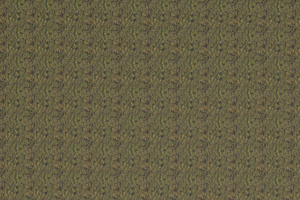
tessellation effect in top down view
The description properties contain data used for the menu entry in the construction menu. This covers:
namefor the display name. It should not be longer than 32 characters.descriptionfor a short descriptive text highlighting the individuality of the terrain material. It should not be longer than 320 characters.iconis a reference to a small@2x.tgaicon which has a resolution of 240×150 pixels shown in the menu.previewIconis reference to a.tgaimage that is used as background image for the info box. It has a resolution of 720×405 pixels.
The categoryList.categories is a list of tags that are used in the terrain generation process and climate filtering. Entries that equal the filename of a climate are used to assign the model to a certain climate. It will not be available in other climates.
The texture applied to the terrain is defined by the following properties:
detailColorTextureis a reference to a texture file that is used for the ground color.detailMetalGlossAoHTextureis a reference to another texture that is used for the physical effects. The alpha channel is used as a heightmap for the ground texture.detailNormalTextureis a reference to a texture that is used for the normal map of the ground.overlayTextureis a reference to a texture that is used as a irregularity overlay to break the tile tessellation effect of the main detail texture.
The detail textures are required to have 4096×4096 pixel resolution. For this reason it is recommended to be sparing with additional textures.
With grass it is possible to reference a resource describing the grass and plants that shall be used for the terrain material. See below for further details.
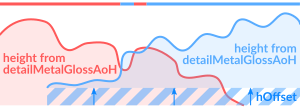
effect of hOffset and detailMetalGlossAoHTexture
The next set of properties is used to scale the textures from above:
detailSizeis the scaling factor of the detail texture.overlaySizeis the scaling factor of the overlay texture.
There are several other properties:
overlayStrengthis the intensity factor for the overlay texture.hOffsetis an offset that is added to the texture heightmap ofdetailMetalGlossAoHTexture. At the edge of a materials area, the terrain material that has the greater height value is visible.priorityis a number that sets the priority of the terrain material. The material with the highest priority is painted on top. This is used to ensure that e.g. asphalt is displayed above the dirt ground. When terrain materials are painted manually, this property is ignored.
Grass & Plants
It is possible to define additional plant sprites that are shown above the ground (as long as they are not deactivated in the graphics settings) as well as select some small plant asset models to be used. They are defined in .grass.lua files:
function data()
return {
  colorTexture = "/terrain/materials/grass_alpine/tex/grass_alpine_albedo_opacity.dds",
  metalGlossAoTexture = "/terrain/materials/grass_brown/tex/grass_brown_metal_gloss_ao.dds",
  normalTexture = "/terrain/materials/grass_brown/tex/grass_brown_normal.dds",
  translucencyTexture = "/terrain/materials/grass_brown/tex/grass_brown_translucency.dds",

  width = 1.0,
  height = 1.0,
  density = 0.0, -- stems per square meter (range allowed 0 to 16)
  lodDistance = 300.0,

  assets = {
    {
      filePath = "/assets/vegetation/plants/fern_01/fern_01.mdl",
      density = 0.01,
      scaleMin = 0.8,
      scaleMax = 1.1,
    },
    ...
  }
}
end


For the 2D grass, there are properties for texture references as well as the geometric parameters. The graphics are defined by some properties:
colorTextureis a texture reference for the color and transparency.metalGlossAoTextureis a texture reference for the physical effects.normalTextureis a texture reference for the normal map effect.translucencyTextureis a texture reference for the thickness of the plant. Thin areas let the sun shine through the backside to entlight the front side. Thick areas are fully shaded.
The size and distribution of the faces on which the texture is projected are defined with another set of properties:
widthis the width of the face in meters.heightis the height of the face in meters.densityis the number of plants per square meter. The allowed range is from 0 to 16.lodDistanceis the maximum distance from where the plants are visible.
To use simple plant models, the assets list can have one or more entries with the following properties:
filePathreferencing a.mdlfile.densityis the number of plants per square meter.scaleMinandscaleMaxare used to scale the