Landscape Assets
The terrain generators use some specialized assets like trees and rocks to decorate the generated landscape. They are generic models with a special metadata struct to recognize them as tree or rock.
Metadata
There are several additional metadata structs for trees and rocks:
function data()
return {
  -- bounding box
  -- collider
  -- lods
  metadata = {
    menuCategory = {
      categories = {
        {
          category = "landscaping_vegetation",
          filterCategories = { "tree", },
          order = 2000,
        },
      },
    },
    description = {
      name = _("European linden"),
      description = _("Place trees individually or with a brush."),
      icon = "eu_lnd_01.tga",
      previewIcon = "/assets/vegetation/tmp_vegetation.tga",
    },

    autoGroundTex = {
      categories = { "forestTree", }
    },
    categoryList = {
      categories = { "broadleaf", "large", "plains", "town", "temperate.clima"  },
    },

    tree = { },
    -- or
    rock = { },

  },
  version = 2,
}
end
The menuCategory struct is used to provide the construction in the right menu. See the construction menu for more details about the menu tags.
The description properties contain data used for the menu entry in the construction menu. This covers:
namefor the display name. It should not be longer than 32 characters.descriptionfor a short descriptive text highlighting the individuality of the asset. It should not be longer than 320 characters.iconis a reference to a small@2x.tgaicon which has a resolution of 240×150 pixels shown in the menu.previewIconis reference to a.tgaimage that is used as background image for the info box. It has a resolution of 720×405 pixels.
Aside from these general
autoGroundTexis a list of references to categories set in some auto ground textures (see below). The asset counts for every of these categories.categoryListis a list of tags that are used in the terrain generation process and climate filtering. Entries that equal the filename of a climate are used to assign the model to a certain climate. It will not be available in other climates.
To mark a model as a tree, the empty tree struct has to be set. To mark a model as a rock, the empty rock struct has to be set. All trees and rocks are available in the according mixed brush tool too.
Auto Ground Textures
The terrain around trees is automatically textured with a ground texture depending on the density of tree or rock models. These ground textures are defined in .agt.lua files:
function data()
return {
  category = "auto.model.tree",         -- "auto.model.rock"
  gridSize = 18.0,
  countFrom = 2,
  countTo = 5,
  groundTex = "forest_floor.gtex",       -- e.g. "rock_ground_medium_brown_grass.gtex"
  individual = true,
  individualCategory = "forestTree",    -- e.g. "rockSandstoneMedium"
}
end
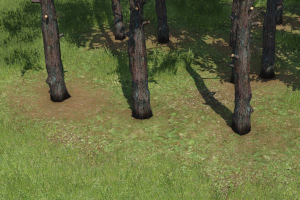
The properties are as follows:
categoryis an identifier for the purpose of this auto ground texture. It is"auto.model.tree"for trees and"auto.model.rock"for rocks. The assets are assigned to one or more of these categories and count for these.gridSizeis the grid size for the count grid of this auto ground texture. The assets that have thecategoryset are counted in each of the grid cells.countFromis the minimum number of instances that has to be counted in a cell to get the texture displayed.countTois the maximum number of instances that has to be counted in a cell to get the texture displayed.groundTexis a reference to the ground texture that should be displayed.individualis a boolean value. If set totruethis ground texture is used around individual models (like roots of a tree) instead of big patches between several of them.individualCategoryis a category that can be referenced from tree/rock models (see above) to be used for them as ground texture.