Environments
Environments define the sun light, atmosphere, water coloring and skybox. The configuration is done in .env.lua files and basically look like this:
function data()
  return {
    atmosphere = {...},
    light = {...},
    shadows = {...},
    water = {...},

    skyBox = {...},
    useSkyBoxOverwrite = false,
  }
end
Atmosphere
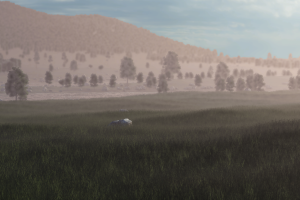
The atmosphere struct contains several properties which are used to simulate the atmospheric light model in the game.
The following properties are adjusted in the simulation
cloudCoverageis the range between blue sky, clouds and rain. Values are between0.0and0.5, the rain starts at around0.45.dayOfYearis the day in the year counting from1to365.timeOfDaySecis the time of the current day in seconds.
The following properties affect the sun and the moon:
sunBloomis the bloom intensity of the sun. Values are between0and1000and smaller values result in larger bloom haze.sunBloomScaleis a scale for the bloom of the sun. Values are between0and10.sunIlluminanceis the illuminance strength of the sun, affecting the indirect light on the planet. Values are between0and100.sunIntensityis the intensity of the sun, affecting the direct light on the planet. Values are between0and100000.sunSizeAngleis the dimension of the sun (in degrees) as seen from the planet. Values are between0and5.moonIlluminanceis the illuminance strength of the moon at night, affecting the indirect light on the planet. Values are between0and100.moonIntensityis the intensity of the night emitted from the moon at night. Values are between0and1000.
The clouds are configured with the following properties:
cloudBaseis the lowest level where clouds are present in meter.cloudTopis the highest level where clouds are present in meter.cloudSpeedis the drift speed of the clouds.cloudPhase
cloudScattering
The mie model describes the amount of scattered light for aerosols (i.e. particles bigger than the visible wavelength) like fog, droplets, haze, etc. The scattered light is independent of wavelength and affects mostly the horizon. Dry climates tend to have low amounts of such particles.
miePhaseGis the g-factor of the mie phase function (Cornette-Shanks). It affects the halo around the sun and horizon.mieScatteringScaleis the strength of mie scattering. Values are between0and1and higher values result in stronger scattering.mieAbsorptionScaleis the strength of the mie absorption. Values can be between0and1and high values lead to strong absorption.mieScaleHeightis the scale for the height influence in the mie model. It affects the mie density and how strong the scattering and absorption are. The factors are based on the height in atmosphere. Values are between0and100.
In the real world, the atmosphere usually has a blue sky at daylight and some red colors in the morning and evening at dawn and sunset. This is caused by the rayleigh scattering phenomena. It describes the amount of scattered light due to air molecules (i.e. particles smaller than the wavelength of light). Its effect is highly dependent on wavelength and affects the entire atmosphere: longer wavelengths (blue-like) are more scattered (this makes the sky blue), while shorter wavelengths (red-like) are more likely to be transmitted (this makes the sunset red).
rayScatteringCoeffis the color of the light spectrum, that is mostly affected by rayleigh scattering.rayScatteringScaleis the strength of rayleigh scattering. Values are between0and1and higher values result in stronger scattering.rayScaleHeightis the scale for the height influence in the rayleigh model. It affects the ray density and how strong the scattering and absorption are. The factors are based on the height in atmosphere. Values are between0and100.
The ozone model describes the amount of light absorption due to ozone layer. It does not scatter the light.
absorptionCoeffis the absorption color defining the light absorption due to ozone.absorptionScaleis the strength of the absorption due to ozone. Values can be between0and1and high values lead to strong absorption.
Additional advanced atmosphere parameters are:
bottomRadiusis the radius of the planet in km.atmosphereHeightis the thickness of the atmosphere in km.heightOffsetis the height/offset of the terrain above the ground in km.fogScaleLowis the scale of fog effect (aerial perspective) when the camera is low above ground. Values can be between0.1and25.0.fogScaleHighis the scale of fog effect (aerial perspective) when the camera is high above ground. Values can be between0.1and25.0.
It is recommended to use the ingame debug tools to experiment with the values.
Light
The light struct consists of several properties:
latitudeis the latitude of the environment in radians. It controls the path of the sun.refBrightnessis a value that adjusts the overall brightness. 10 is the maximum value that results in a darker mood. Values near 0 are very bright while 0 is absolute darkness.ambientDayColoris an ambient color that tints the whole world slightly during day time.ambientNightColoris an ambient color that tints the whole world slightly during night time.hdrExposureDayis a number used to scale the hdr exposure during day time.hdrExposureNightis a number used to scale the hdr exposure during night time.hdrContrastDayis a number used to scale the hdr contrast during day time.hdrContrastNightis a number used to scale the hdr contrast during night time.
Sky
While most of the sky box is dynamic, there are a few textures used for the elements on the sky:
starsTexis a texture reference for the texture that shall be used as sky in the night.starsTexMaskis a texture reference for a mask texture that provides brightness info about thestarsTex. White pixels are consider as very bright star lights.moonTexis a texture reference for the texture that shall be used as the moon.environmentTexis a default skybox used for simple reflections. It is a cube map .dds texture.
Water
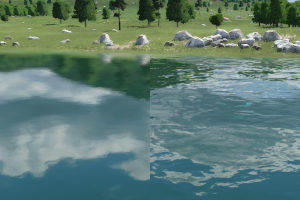
less and more intense waves
The water effects are adjusted with the properties in the water struct:
normalTexis a texture reference to a normal map that is used for the wave effects on the water.normalScaleis a factor to adjust the intensity of the wave effect. 0 results in still water.preferLowFreqis a boolean value. If set to true, the water movement effect is more subtle to simulate still water.roughnessis another factor to control the roughness of water surface. The higher this factor is, the less reflexion effects will occur on the water surface.depthColorTexis a texture reference to a file that contains a set of colors that is used for the deepness effect of water.particleDensity extinctionCoeffis the factor that controls the clearness of the water. 0 is total transparency, 1 is opaque water. The lower the value is, the deeper can be seen through the water.waveFoamTexis a texture reference to a texture that shows some waves. If set, there is a shoreline effect with animated foam waves visible.
Most of the properties for water effects can be controlled with the ingame debug tools too.