This is an old revision of the document!
Finances
The overview of the company's finances is one of the most important aspects for players. The company window can be opened by clicking on the account balance in the bottom left corner or by selecting the company headquarters building on the map. The window consists of five different tabs:
 to open the radial menu and then selecting
- Overview gives an overview on revenue, expenditure, debt, and town development over time.
- Finances contains a detailed table of your company's finances for up to four years.
- Assets display progress and statistics of your infrastructure development.
- Tracks shows a diagram of total track lengths.
- Loans shows all offered and obtained loans.
- Delivery Time gives an overview of the expected delivery time of each cargo type.
In the following, we will provide a more detailed description of the most important sections.
Overview

The overview shows four graphs.
- Revenue and Expenses displays the revenue (does not contain loans), and expenses for each year. If the blue column is larger than the red column in a given year, your company was profitable in that year.
- Balance shows the current bank account (cash) and the company value over time. The value equals the cash plus assets (in this case the value of your vehicles).
- Debt and Cash shows the current debt and the sum of your current debt and current cash. If the blue column (debt + cash) is above the 0$ axis, then you can pay back all your open loans.
- Towns shows the development of the sizes of all your town districts. The residential curve is equal to the total population on your map.
Finances
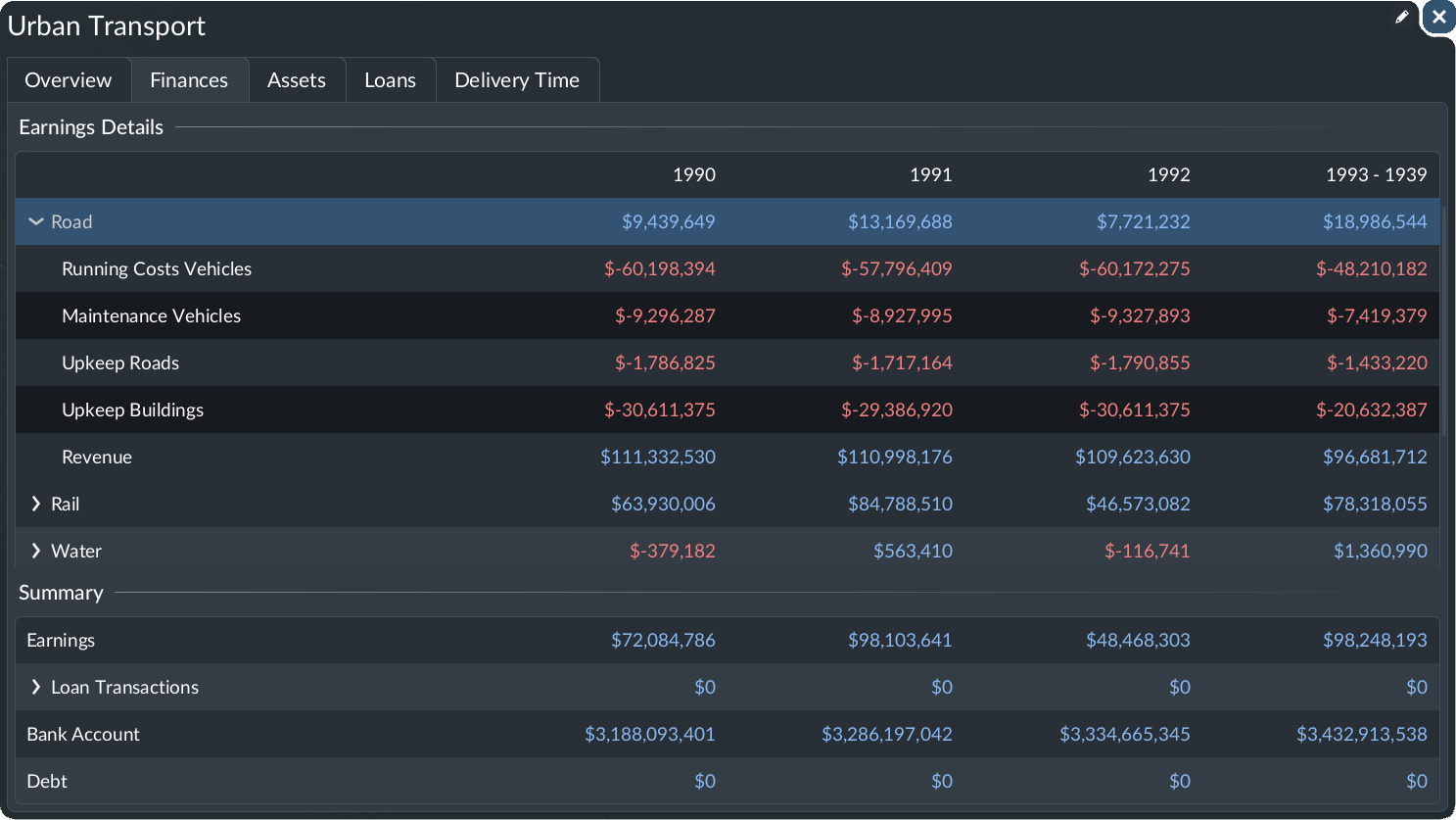
The finances table shows all income and spending sources grouped by topics. The upper part of the table contains the following figures:
- Road / Rail / Water / Air contains all regular costs and incomes related to road vehicles.
- Running Costs for Vehicles are the costs for operating the vehicles. In reality, this might correspond to fuel or personnel costs.
- Upkeep Buildings are the runnings/upkeep costs for all buildings belonging to this transport type.
- Upkeep Tracks/Roads same logic as upkeep for buildings but only for rail/road transport types.
- Revenue income that is obtained when a cargo item or passenger arrives at the destination.
- General contains all income/expenses not related to specific transport types
- Upkeep Warehouses operating costs for warehouses.
- Subsidies financial rewards or penalties related to subsidy contracts.
- Investments contains all one time costs that originate from construction works or purchase of new vehicles.
- Vehicles are the costs for new vehicles of any type.
- Roads are the costs for construction, upgrade and replacement of roads.
- Tracks are the costs for construction, upgrade and replacement of tracks.
- Infrastructure are the costs for any other construction like stations, headquarter buildings etc.
- Loan Interest are the additional fees that have to be paid monthly for the loan.
Below are four additional rows:
- Earnings the sum of all rows from the table above
- Loan Transactions sum of all loan principal repayments and all new loans taken
- Bank account current bank account statement (cash)
- Debt current total debt
Assets
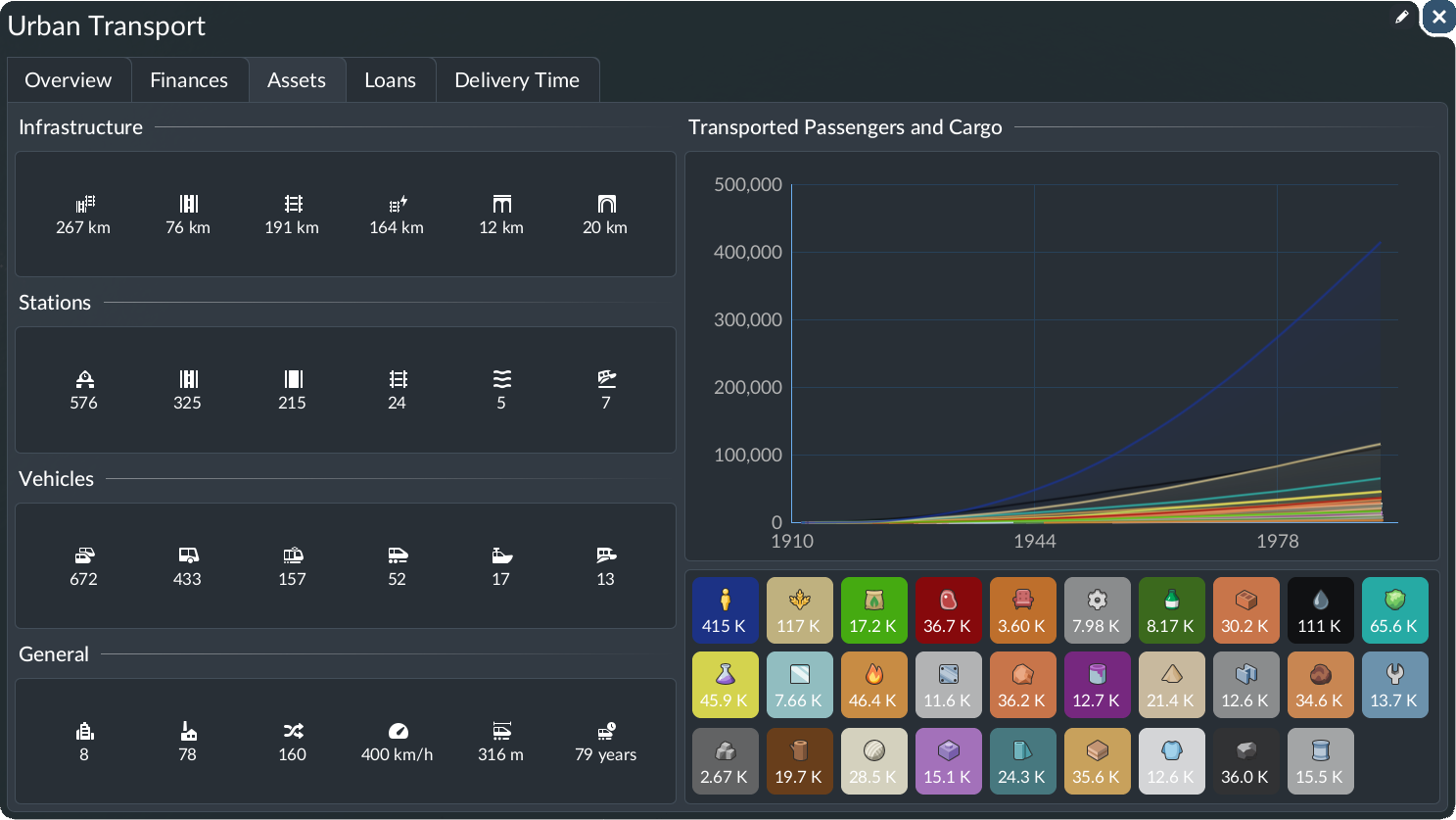
The assets tab provides interesting information on the state of the company. On the left-hand side, statistics are displayed of what the player built and purchased so far:
- The Infrastructure section contains key figures for the overall road and rail infrastructure length, bridges and tunnels.
- The Stations section contains a breakdown of stations across the different transport modes.
- The Vehicles section contains a similar breakdown for the vehicle types.
- The General section provides info about the amount of towns and industries on the map, the total number of lines, the fastest, longest and oldest vehicle on the map.
The graph on the right-hand side shows the number of passengers and amount of cargo items for each type that were transported over time. The buttons within the legend below the graph can hide or reveal the curve corresponding to the cargo type in the graph and show the current total number per type.
Loans

At the beginning of a new game, the player's bank account is empty, and they need to take a loan to start building. It is recommended to pay back the loan as soon as possible because there is a monthly interest rate. How high this rate is depends on the level of difficulty.
To take a loan, open the Loans tab and select one of the four available loans. Loans are offered randomly to the player, with some bias. For example, usually there are smaller and cheaper loans, as well as bigger and more expensive loans, available. The player can take at most four loans at a time, and new loans are offered regularly, but not immediately after taking one.
The loan card displays the 1 principal value of the loan; 2 the loan term, i.e., after how many months the principal needs to be paid back; 3 the interest rate; 4 and the annual repayment amount (spread over 15 days intervals). Once a loan is obtained, the active loan is shown in the lower row 5. The loan cards display the outstanding debt, the remaining loan term, and, again, the interest rate and annual repayment.
When you have enough cash, you can repay the outstanding debt at once by selecting the repay button.
Delivery Time

As the text within the tab says, the graph shows the expected delivery time for each cargo type. This is a new feature in Transport Fever 3. Different cargo types have different expected delivery times. When a cargo item is dropped off after the expected delivery time, the town rating decreases.
Company Window
The company window can be opened by selecting the company button in the game bar or on console in the radial menu. It has two tabs. The main tab gives an overview over the current progress of the company level. The second tab lists all completed and open achievements.
Company Progression
 The company tab gives an overview of the progression of your company. The company rank depends on the population of the map.
When requirements of the towns are met, then the towns start growing and the population increases. Once the population passes the next threshold, the company will level up.
With each gained company rank, the player unlocks new perks, such as landmarks, prospections, special mechanics, and headquarter upgrades. Each feature will help the player in a specific way to tackle problems on their map and is briefly described below.
The company tab gives an overview of the progression of your company. The company rank depends on the population of the map.
When requirements of the towns are met, then the towns start growing and the population increases. Once the population passes the next threshold, the company will level up.
With each gained company rank, the player unlocks new perks, such as landmarks, prospections, special mechanics, and headquarter upgrades. Each feature will help the player in a specific way to tackle problems on their map and is briefly described below.
The current rank is displayed when the player selects the last colored progress indicator in the right column. Selecting an individual row shows the player which features they unlocked so far and which they will eventually unlock in the center.
When a rank that has not been achieved yet, is selected, then the progress bar in the upper center shows how much more the population needs to grow until this rank is unlocked.
Perks
In Transport Fever 3, the player unlocks perks when their company level increases. With each level-up, new perks are unlocked. These perks can be divided into the following categories:
Landmarks

Landmarks either have to be built or they can be placed right away, depending on the gameplay setting. By default, they have to be built first. Each landmark has unique cargo requirements. Deliver these cargo items to the landmark construction site until it is fully erected.
Once a landmark is fully built, it gives special bonuses within the town municipality in which it was placed. These bonuses typically improve the town rating. E.g., the Colosseum reduces road vehicle noise, or the great lighthouse increases the top speed of all water vehicles.
Prospections
When the player unlocks a prospection, they can activate this prospection within a town municipality area, which will start an expedition to look for resources of the selected type. When the resources are available within the area, a new industry will be founded. Note that a prospection for fish will, of course, fail in an area where there is no water.
Mechanics
There are three different special mechanics available:
- Marketing campaign can be launched in a town and will increase the reputation and encourage the residents to use public transportation over their private cars.
- Industry greenification reduces noise and pollution of the selected industry.
- Pollution cleaning plants absorb emissions but emit a lot of noise.
Headquarters Upgrades
Headquarters upgrades are sometimes purely decorative, but most add-on modules either increase the reputation recovery or the town growth of the capital.
