Free Game
For most players, the free game mode is the most relevant feature of Transport Fever 3. In this mode you can use randomly generated or handcrafted maps and play on them as long as you like, whether with money or in complete sandbox setting.
Create New Game
To create a new game in free game mode, press the New Game card in the main menu. There are 4 steps to start the new game:

1. Map Selection
|
|
|


|
|
|


You may either play on an randomly generated map or use an existing one from the mod hub or built in the map editor. To generate a new map, select your preferred climate for map generation. The climate influences the optics of your game and the landscape, but has no direct influence on the simulation. However the differences in the terrain affect the usefulness of some transport modes.
The temperate climate features green grasslands and forests as well as rivers, lakes and higher mountains while the subarctic climate has large fjords, swamp lands and massive mountains. In contrast, the dry climate features deep canyons, flat platform hills and less vivid vegetation. The tropical climate has the possibility to create islands and consists mostly of tropical plants like palm trees.
2. Map Settings
 After selecting a climate, the first of the appearing tabs Settings offers various map related settings. Its first section
World offers settings for the map dimension:
- Map Size sets the size of the map. See map size documentation for more details on available sizes.
- Map Format sets the side ratio of the map. See map size documentation for more details on how this affects the map.
- Seed is a value used as a key for randomization. With the same seed and the same settings, a map will be created identical each time.
Each of the climates has it's own map generator with individual properties in the second section Terrain. Tweak the sliders and other options to adjust the generated maps according to your needs. Beside the vanilla generators, it is possible to add additional terrain generators with mods, you may find some at the mod hub. They all come with their individual set of options.
The third section Civilization contains the settings for towns and industries:
- Names offers the possibility to select lists that should be used for town, bus stop and residents names. It is possible to add additional lists by mods. You may find some at the mod hub.
- Towns Density is the amount of towns on the map. Less dense settings initially result in fewer but slightly larger settlements, higher density increases the number of individual towns while they have a smaller initial size.
- Industry Density is the amount of initial industries on the map. Less dense settings result in higher per-industry production. The exact amount of industries is also depending on the population size due to the town demands. More industries will appear over time.
- Start Year can be set in ten-year-intervals from 1900 to 2020.
In the fourth section Environment, additional settings are available:
- Weather allows the selection of the default weather mode. It can either be
Dynamicwhich is a randomly changing pattern or a static setting out ofSunny,CloudyorRainy. - Time of Day allows the selection of the default time mode. It can either be
Dynamicwhich is a cycle that changes between dawn and dusk,Continuouswhich is a linear loop through day and night, theLocal Timeor a static setting out ofMorning,Day,EveningorNight. - Tutorial allows switching on or off the onboarding tutorial.
When playing for the first time, it is recommended to play the tutorial once to get the basics.
3. Gameplay Settings
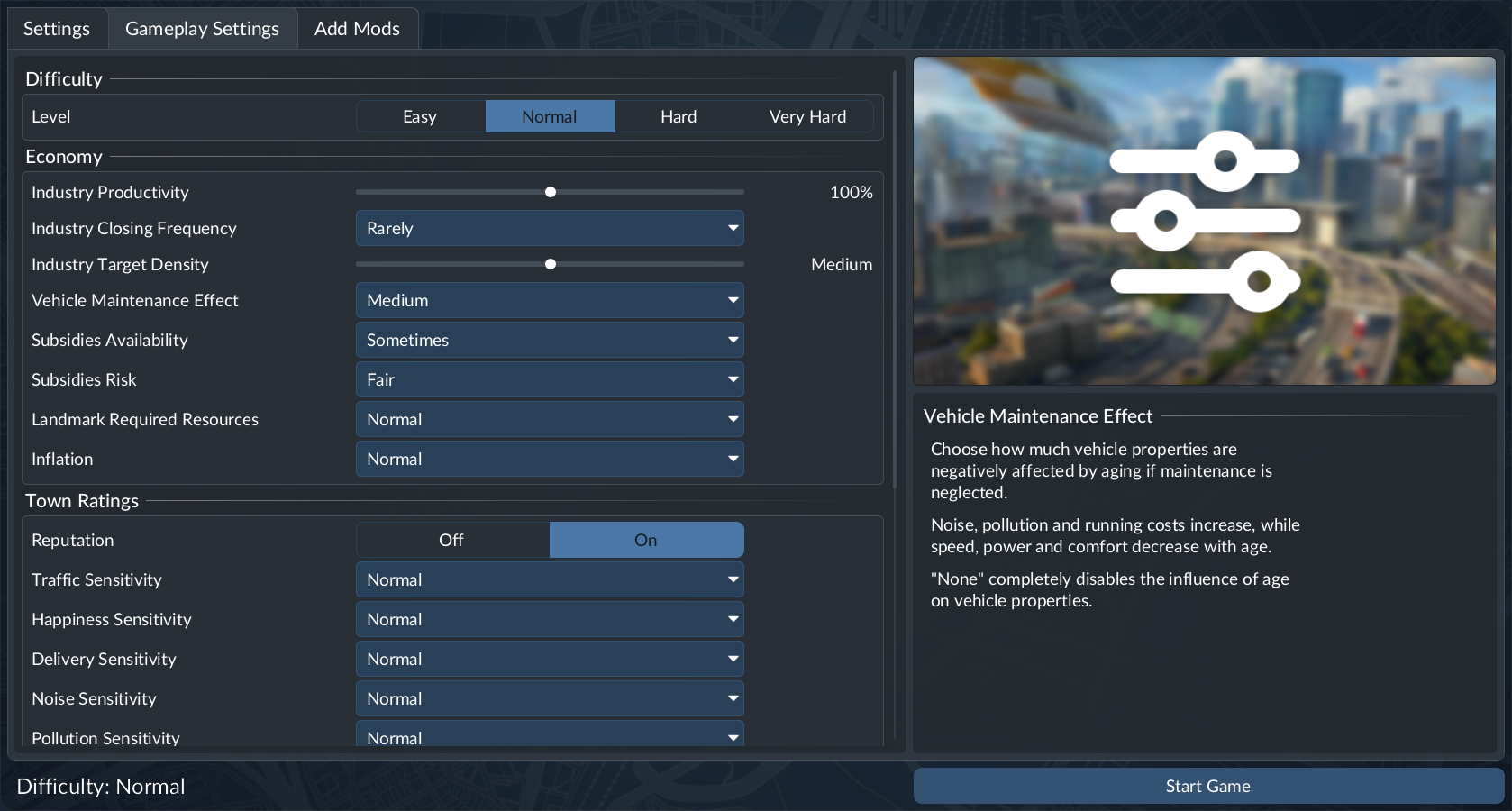
Further settings that impact the gameplay on the map can be tuned in the Gameplay Settings tab. At the top it is possible to select a Difficulty level. It automatically sets all the settings below to the according values of the difficulty presets.
The Economy section allows tuning of the industries and resources:
- Industry Productivity adjusts the annual throughput of industries. The higher the setting, the more often industries can produce cargo items.
- Industry Closing Frequency sets the chance of unused industries to be flagged for closing. They will be closed if their output is not delivered somewhere within a grace period.
- Industry Target Density sets the density of industries that is targeted over time. Keep in mind that new industry types will spawn over time, so the industry density will grow over time anyway.
- Vehicle Maintenance Effect sets the impact of bad maintenance on older vehicles. The impact includes increased noise, pollution and running cost as well as decreased top speed, power and comfort. It is possible to disable the maintenance effect altogether with
None. - Subsidies Availability adjusts how often subsidies are offered.
- Subsidies Risk sets the difficulty level for subsidies. Higher risk increases cargo delivery targets, shortens deadlines, and reduces upfront payments.
- Landmark Required Resources adjusts the amount of cargo resources that need to be delivered to complete the construction of a landmark. If set to
None, they complete immediately. - Inflation sets how the cargo and passenger income is impacted by inflation. With inflation, the income is reduced proportionally to the company rank.
The Town Ratings section impacts the town growth factors:
- Reputation is used to (de-)activate the reputation.
- Traffic Sensitivity adjusts the influence of road traffic on town development. Higher values make towns more sensitive to traffic congestion.
- Happiness Sensitivity adjusts the influence of passenger happiness on town development. Higher values make towns more sensitive to unhappy passengers.
- Delivery Sensitivity adjusts the influence of on time delivery of cargo on town development. Higher values make towns more sensitive to delayed delivery of cargo.
- Noise Sensitivity adjusts the influence of noise near residential buildings on town development. Higher values make towns more sensitive to noise.
- Pollution Sensitivity adjusts the influence of pollution on town development. Higher values make towns more sensitive to pollution.
With active Sandbox Mode mod, it is possible to adjust the sensitivities independently for each town.
The income and expenses difficulty can be tuned in the Finances section:
- Vehicle Costs are the one-time buy costs when buying new vehicles or duplicating existing ones.
- Vehicle Maintenance are the reoccurring costs for the upkeep of vehicles.
- Infrastructure Costs are the one-time construction costs when building the infrastructure and buildings.
- Infrastructure Upkeep are the reoccurring costs for the upkeep of the infrastructure and buildings.
Further settings can be found in the Advanced section:
- Industries allows selecting a different economy to be used. It is possible to add custom economies with mods.
- Population adjusts the overall population on the map. Increasing the population has an impact on the simulation performance.
- Passenger Income is a multiplier for all income generated from passenger transport.
- Cargo Income is a multiplier for all income generated from cargo transport.
- Reforestation allows enabling or disabling the regrowth of trees in forest areas that were bulldozed before.
4. Mods

The third tab Add Mods allows activating mods and content from the Deluxe Edition or Pre-Order Pack. Use the Activate buttons to activate the mods you want to use.
The following four mods are shipped with the game:
- Sandbox Mode: The Sandbox Mode allows to change various aspects of the game. With this mod, it is possible to modify the bank balance, set the in-game calendar to a specific date, and construct new towns or industries. Additionally, this mod allows adjusting cargo demands and the size of generated towns, or even demolishing them.
- No Costs: The No Costs mod disables money completely. Everything is for free and the bank balance is shown as infinite.
- Tycoon: The Tycoon mod sets the company rank to the highest level and unlocks all perks. All other aspects of the game remain unchanged. This allows to place all landmarks, prospect for resources and use the marketing campaigns and the greenify industry tool.
- Vehicles: No End Year: Vehicles that are purchasable by the player do not have an end year. As soon as they become available, they remain available forever.
By pressing the Start Game button in the bottom right corner, the new game is started. Be aware, that the creation of the map may take longer the bigger the size of the map is set. Further it depends on the amount of industries and towns that were selected in the previous steps. If you like to get back to the climate selection instead, you may press the Back button in the top left corner.

Load Game
Existing games can be loaded by selecting the Load Game card in the main menu or the Load Game button in the pause menu while ingame.
A savegame from the grid can be directly started by selecting its card. To access autosaves of the same savegame or adjust the gameplay settings or list of active mods, click on the  icon of the card. If the savegame allows editing the settings or mod list, the tabs as described above are available.

To load the game, press the Load Game button in the bottom right corner. If this button is deactivated, it is likely that a mod is missing.
The last played savegame can be continued directly from the main menu.