Table of Contents
Vehicle Types
Vehicle models in Transport Fever 3 are bound to one of the means of transportation road, rail, water or air. The distinction between the types of vehicles is achieved by specialized metadata entries in the .mdl-files for each type.
In comparison to Transport Fever 2, most of the metadata refer to model parts by using the node names. Hence it is important to set proper names for the nodes. The names are displayed on the left side of the model node tree in the Model Editor too. By double clicking, you can copy these names.
Land Vehicles
All vehicles on road and rail have some common properties which are specified in the landVehicle property:
...
landVehicle = {
  engines = {
    {
      power = 150,
      tractiveEffort = 30,
      type = "ELECTRIC",
    },
  },
  topSpeed = 19.444,
  weightEmpty = 14000,
  weightMaxPayload = 5000,
  friction = 0.02,
  brakeDeceleration = 2.5,
},
...
A vehicle may have zero, one or more engines in the engines struct. Each engine has the following three properties:
typedescribes the motor type. Available are"HORSE","STEAM","DIESEL","ELECTRIC".poweris the maximum power the engine can produce in kW.tractiveEffortis the maximum tractive force the vehicle can develop in kN.
Beside the engines, there is the topSpeed in meter per second as well as the weightEmpty and weightMaxPayload of the vehicle in metric kilogram. The weightMaxPayload describes the additional weight when the vehicle is fully loaded. To adjust the acceleration and deceleration behavior, it is possible to modify the friction and brakeDeceleration values.
Road Vehicles
Road vehicles are bound to the street network built by the game or the player. They can drive along streets as well as on construction lanes of the right type in stations, depots and similar constructions.
They are indentified by the roadVehicle metadata struct and the .mdl-files usually are located in the subfolders:
/vehicle/bus/vehicle/car/vehicle/truck
Metadata

headlight, blinker and turning wheel

steering part of L'Obéissante
The roadVehicle metadata struct consists of several struct children as well as the properties for speed and weight:
...
roadVehicle = {
  config = {
    axles = { "w2", },
    fakeBogies = {
      { -- LOD 0
        {
          group = "RootNode",
          offset = 0,
          position = 0,
        },
      },
      { -- LOD 1
        {
          group = "RootNode",
          offset = 0,
          position = 0,
        },
      },
      ...
    },
    steeringParts = { },
    wheels = { "w1_lft", "w1_rgt", },
  },
},
...
The config struct inside the roadVehicle struct covers several properties regarding the 3D model:
axlesis a list of node name references pointing to the nodes which are axles that only rotate around the y axis while the vehicle is moving. This is usually used for rear axles.fakeBogiesis a list of fake bogie definitions, one list per LOD. Usually road vehicles have at least one positioned approximately in the middle between the steering axis and the first back axis.steeringPartsis a list of node names of nodes that are rotating around z axis when the vehicle turns around curves.wheelsis a list of node name references pointing to the nodes that represent wheels which rotate around z axis in curves and around y axis while the vehicle is rolling. This is usually used for front wheels.
Keep in mind to set the correct mesh origins for the vehicle parts to ensure they rotate in the right way. For axles, the origin should be aligned in the center in terms of the x and z axis. Otherwise the axle will wobble ingame.
Events

Door animation of BK 670 bus
When the road vehicle uses the default road transformator, the following animation events can be used to support model aspects like opening doors:
foreveranimation is used for roof ventilators or other elements that turn independently from the speed of the vehicle. It is looped forever and has no fixed length.driveanimation is used for vehicle parts that move according to the current speed of the vehicle.open_all_doorsis triggered after a vehicle stops at a station or bus/tram stop. It is triggered for stops on both sides of the vehicle.close_all_doorsis triggered before the vehicle leaves a station or bus/tram stop. It is triggered for stops on both sides of the vehicle.open_doors_rightis triggered after a vehicle stops at a station or bus/tram stop. It is only triggered for stops on the right side.close_doors_rightis triggered before the vehicle leaves a station or bus/tram stop. It is only triggered for stops on the right side.open_doors_leftis triggered after a vehicle stops at a station or bus/tram stop. It is only triggered for stops on the left side.close_doors_leftis triggered before the vehicle leaves a station or bus/tram stop. It is only triggered for stops on the left side.brake_lights_on/brake_lights_offis triggered when a vehicle is applying its brakes.blink_lights_left_on/blink_lights_left_offis triggered when turning left or departing at a stop.blink_lights_right_on/blink_lights_right_offis triggered when turning right.
Rail Vehicles
Rail vehicles run on the track network built by the player and can drive along built tracks as well as on track lanes in stations, depots and similar constructions.
They are indentified by the railVehicle metadata struct and the .mdl-files usually are located in the subfolders:
/vehicle/trainfor motorized rail vehicles/vehicle/wagonfor unmotorized rail vehicles/vehicle/tramfor trams.
Metadata
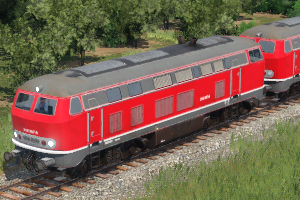
second locomotive without headlights
The railVehicle metadata struct consists of several struct children as well as the properties for speed and weight:
...
railVehicle = {
  config = {
    axles = { "w1", "w2" },
    fakeBogies = {
      { },-- LOD 0
      { },-- LOD 1
      ...
    },
  },
},
...
The config struct inside the railVehicle struct covers several properties regarding the 3D model:
axlesis a list of node name references pointing to the nodes which are axles that only rotate around the y axis while the vehicle is moving.fakeBogiesis a list of fake bogie definitions, one list per LOD. Usually simple rail vehicles only have fake bogies in LODs without seperate axles. Trains and trams with jacobs bogies and other nested constellations might need these also for lower LODs.
Keep in mind to set the correct mesh origins for the vehicle parts to ensure they rotate in the right way. For axles, the origin should be aligned in the center in terms of the x and z axis. Otherwise the axle will wobble ingame.
Events

wheel animation of a steam locomotive
When rail vehicles use the default transformator, the following animation events can be used to support model aspects like opening doors:
foreveranimation is used for roof ventilators or other elements that turn independently from the speed of the vehicle. It is looped forever and has no fixed length.driveanimation is used for vehicle parts that move according to the current speed of the vehicle.wheelsanimation is used for vehicle parts that move according to the current speed of the vehicle. The animation length is mapped to the wheel rotation by the game engine.open_all_doorsis triggered after a vehicle stops at a station or bus/tram stop. It is triggered for stops on both sides of the vehicle.close_all_doorsis triggered before the vehicle leaves a station or bus/tram stop. It is triggered for stops on both sides of the vehicle.open_doors_rightis triggered after a vehicle stops at a station or bus/tram stop. It is only triggered for stops on the right side.close_doors_rightis triggered before the vehicle leaves a station or bus/tram stop. It is only triggered for stops on the right side.open_doors_leftis triggered after a vehicle stops at a station or bus/tram stop. It is only triggered for stops on the left side.close_doors_leftis triggered before the vehicle leaves a station or bus/tram stop. It is only triggered for stops on the left side.brake_lights_on/brake_lights_offis triggered when a vehicle is applying its brakes.
Trams with the default transformator have the same events except for the wheels animation and additionally they support:
blink_lights_left_on/blink_lights_left_offis triggered when turning left or departing at a stop.blink_lights_right_on/blink_lights_right_offis triggered when turning right.
For both reversible trains and trams, see the description in the next chapter.
Multiple Units
Some rail and tram vehicles are defined as multiple units. Then they are a fixed consist of more than one model. The configuration files for multiple units are usually located next to the .mdl files and have .mu.lua as file ending.
function data()
return {
  vehicles = {
    { name = "ice1.mdl", forward = true },
    { name = "ice1_waggon_1.mdl", forward = true },
    ...
    { name = "ice1.mdl", forward = false },
  },
  name = _("VEHICLE_MULTIPLEUNIT_ICE1_NAME"),
  desc = _("VEHICLE_MULTIPLEUNIT_ICE1_DESCRIPTION"),
  filterTags = { "default" },
  groupFileName = "",

}
end
The configuration has four properties:
vehiclesis a list of vehicle models used in the multiple unit consist. For each of the vehicles there are two properties:nameis a reference to the model file relative to the location of the.mu.luafile.forwardis a boolean value. If set totruethe model is used as is, otherwise it is flipped by 180 degrees.
nameis the name of the multiple unit that is used in the vehicle store. By encasing it in_(), it is marked to be localized in the mods ''strings.json''.descis the description of the multiple unit used in the vehicle store. It can be translated too. The technical data is calculated based on the individual vehicles used in the multiple unit.filterTagsis a list of custom tags. The multiple unit will only appear in depots when they match all of the tags defined in the depot. If the list of the multiple unit is empty, the multiple unit does not appear in any depot. If the list is not set, it is considered as having the tagdefaultwhich is used in vanilla depots.groupFileNameis an optional reference to another multiple unit or a model to define this multiple unit as a variant under the other multiple unit / model as parent. See the buy menu group explanation for further details.
For multiple units to be available, all of their parts have to be in their respective availability timespan.
Water Vehicles
Ships are bound to the navigatable water on the map. The routes are dynamically calculated based on the reachable water regions. In harbors, they stop at designated points.
They are indentified by the waterVehicle metadata struct and the .mdl-files usually are located in the /vehicle/ship subfolder.
Metadata
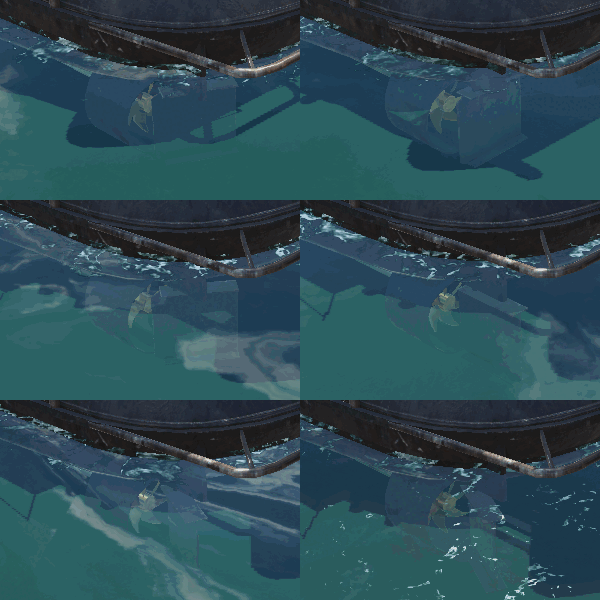
spinning propeller and turning rudder
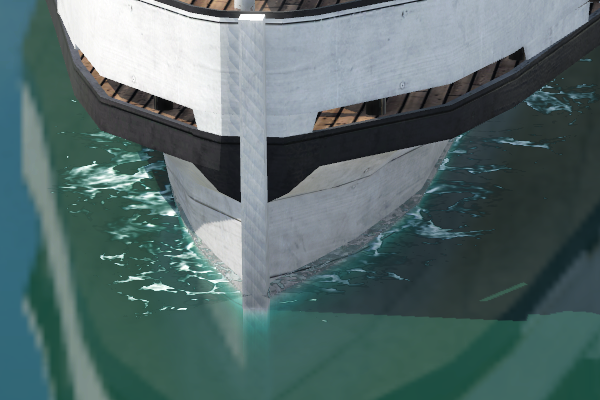
spume around the water line of the ship
The waterVehicle metadata struct consists mostly of properties used for simulation:
waterVehicle = {
  area = 5,
  availPower = 294000.0,
  weightEmpty = 135000.0,
  maxRpm = 55,
  topSpeed = 7.5,
  type = "BIG",
  waterLine = {
    -- waterline configuration
  }
},
There are the following properties:
areais the maximum under water cross sectional area of the ships body in m², which linearly correlates with the drag forceavailPoweris the maximum available power the engines can produce in W (not in kW!)weightEmptyis the empty weight of the ship in kgweightMaxPayloadis the additional weight in kg when the vehicle is fully loadedmaxRpmis the maximum rotation per minute of the main paddle wheel. This value is used for animation calculation.topSpeedis the maximum speed the vehicle can reach in meter per second.typeis used to distinct between small and large ships. Only"SMALL"ships can stop at the small piers."BIG"ships need the large pier.
The waterLine struct describes the form of the ship at water level that is used to generate the spume around the ships body. It is a list of two-value pairs each representing a point with x- and y-coordinate relative to the model origin.
Events

Drive Animation of Frontenac Steam Ship
Ships support some animation events. They can be used in mesh nodes to support model aspects like opening doors:
foreveranimation is used for continous animations like the radar beacons on ships.driveanimation is used for vehicle parts that move according to the current speed of the vehicle.paddlesis used for the rotating paddles of steam ships and the ones of more modern motor ships. When using the default paddle animation, paddle wheel steamers can keep the mesh orientation as usual, for modern propellers rotation around the x axis, simply rotate the mesh by 90° so the y axis of the mesh points in the direction of the intended rotation axis.rudderis used for the directional rudder of ships. The animation has to have keyframes from 0 to 1000, where 0 and 1000 are the extreme positions and 500 is the middle position.open_all_doorsis triggered after a vehicle stops at a harbor. It is triggered for stops on both sides of the vehicle.close_all_doorsis triggered before the vehicle leaves a harbor. It is triggered for stops on both sides of the vehicle.open_doors_rightis triggered after a vehicle stops at a harbor. It is only triggered for stops on the right side.close_doors_rightis triggered before the vehicle leaves a harbor. It is only triggered for stops on the right side.open_doors_leftis triggered after a vehicle stops at a harbor. It is only triggered for stops on the left side.close_doors_leftis triggered before the vehicle leaves a harbor. It is only triggered for stops on the left side.
Keep in mind to set the correct mesh origins for the vehicle parts to ensure they rotate in the right way. For paddles and propellers, the origin should be aligned in the center in terms of the x and z axis. Otherwise they will wobble ingame.
Air Vehicles
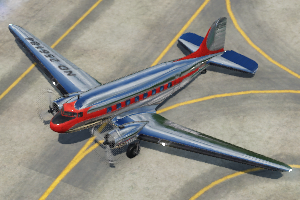
tilted plane on ground
Airplanes are not bound to any terrain or infrastructure except the airports where they land, stop and start.
They are indentified by the airVehicle metadata struct and the .mdl-files usually are located in the /vehicle/plane subfolder.
Metadata
The airVehicle metadata struct consists of several struct children as well as the properties for speed and weight:
airVehicle = {
  axles = {
    {
      position = { -2.23, 0.37, },
      radius = 0.49,
    },
    ...
  },
  wheels = {
    {
      position = { 11.66, 0.43, },
      radius = 0.34,
    },
    ...
  },
  config = {
    axleRadii = { 0.49, ... },
    axles = { "w2_bck_lft", "w2_bck_rgt", },
    fakeBogies = {
      {
        {
          group = "RootNode",
          offset = 0,
          position = 5,
        },
        ...
      },
      ...
    },
    steeringParts = { "gear_g1_steering", },
    wheelRadii = { 0.34, },
    wheels = { "w1_frt", },
  },
  hasFlaps = true,
  maxThrust = 160000,
  timeToFullThrust = 3,
  topSpeed = 234.7222222,
  weightEmpty = 17819,
  weightMaxPayload = 5000,
  wingArea = 64,
  type = "BIG",
},
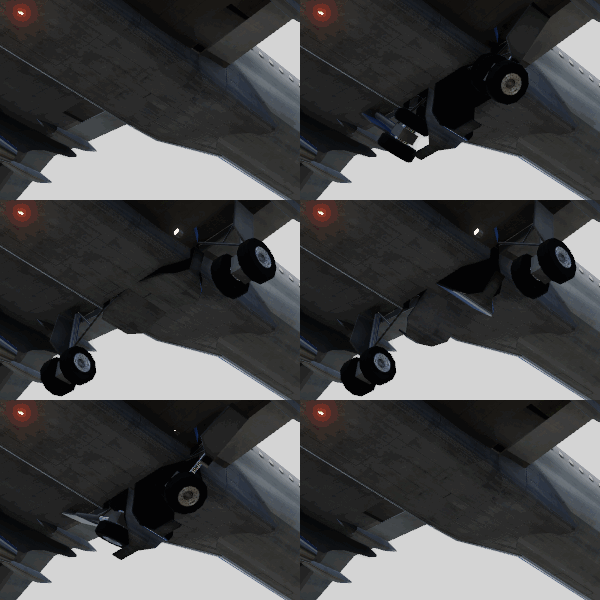
Extension and retraction of the landing gear
To calculate the correct positioning of the planes, additional info about the axles and wheels is needed. Both are lists with an entry for every position along x axis where axles or wheels are. Each entry has two properties:
positionis the distance along x and z axis from the model origin.radiusis the half diameter of the wheel.
Further info used for animation and positioning is provided in the config struct:
axlesis a list of node name references pointing to the nodes which are axles 3 that only rotate around the y axis while the vehicle is moving.axleRadiiis a list of half diameters of the axles in meter for every axle node listed in the property directly above. It is used to calculate the plane tilting on ground when the axles and wheels are not at the same height level and size.fakeBogiesis a list of fake bogie definitions. Air vehicles with complicated axle and wheel constellations might need these.steeringPartsis a list of node names of nodes that are rotating around z axis when the vehicle turns around curves.wheelsis a list of node name references pointing to the nodes that represent wheels 11 which rotate around z axis in curves and around y axis while the vehicle is rolling.wheelRadiiis a list of half diameters of the wheels in meter for every wheel node listed in the property directly above. It is used to calculate the plane tilting on ground when the axles and wheels are not at the same height level and size.
Beside the config struct, there are additional properties used for the simulation of planes and helicopters:
hasFlapsis a boolean value providing info about the presence of flaps in the vehicle.maxThrustis the maximum total thrust the engines can generate in N.idleThrustis the thrust generated by the engines in idle state in N.isHelicopteris a boolean value that is set to true when the air vehicle is simulated with vertical landing and take-off.timeToFullThrustis the time the engines need from idle state to generate full thrust in seconds.topSpeedis the maximum speed the vehicle can reach in meter per second.weightEmptyis the empty weight of the ship in kg.weightMaxPayloadis the additional weight in kg when the vehicle is fully loaded.wingAreais the wing area in m², which correlates linearly with the lift force.typeis used to distinct between small and large planes. Only"SMALL"planes can land at the small airfields."BIG"planes need the large airports.
Events
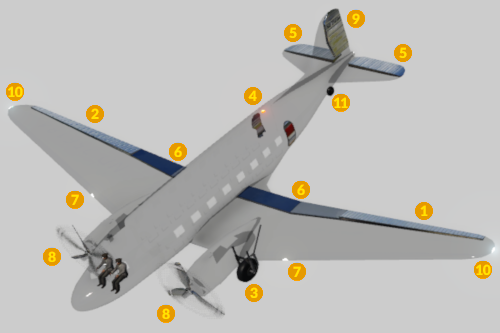
plane config elements
Planes support some animation events. They can be used in mesh nodes to support model aspects like opening doors:
foreveranimation is used for elements that turn independently from the speed of the vehicle. It is looped forever and has no fixed length.driveanimation is used for vehicle parts that move according to the current speed of the vehicle.aileron_leftis used for the left aileron 1 used when the aircraft is rolling. The animation has to have keyframes from 0 to 1000, where 0 and 1000 are the extreme positions and 500 is the middle position.aileron_rightis used for the right aileron 2 used when the aircraft is rolling. The animation has to have keyframes from 0 to 1000, where 0 and 1000 are the extreme positions and 500 is the middle position.beacon_lightsis triggered repeatedly to highlight the body of the plane 4. The default animation is a flash.elevatoris used for the elevator 5 used when the aircraft is pitching. The animation has to have keyframes from 0 to 1000, where 0 and 1000 are the extreme positions and 500 is the middle position.flapsis used for the flaps 6 that are used especially during take off and landing. The animation has to have keyframes from 0 to 1000, where 0 is the retracted and 1000 the extended state.landing_light_on/landing_light_offis triggered to switch on or off the landing lights 7.props_on/props_offanimations shows and rotates the propellers 8 on slow speeds.props_blurred_on/props_blurred_offanimations shows and rotates the propellers on fast speeds.rudderis used for the directional rudder of planes 9. The animation has to have keyframes from 0 to 1000, where 0 and 1000 are the extreme positions and 500 is the middle position.strobe_lightsis triggered repeatedly to highlight the extremities of the plane 10. The default animation is a double flash.open_all_doorsis triggered after a vehicle stops at a gateway. It is triggered for gateways on both sides of the vehicle.close_all_doorsis triggered before the vehicle leaves a gateway. It is triggered for gateways on both sides of the vehicle.open_doors_rightis triggered after a vehicle stops at a gateway. It is only triggered for gateways on the right side.close_doors_rightis triggered before the vehicle leaves a gateway. It is only triggered for gateways on the right side.open_doors_leftis triggered after a vehicle stops at a gateway. It is only triggered for gateways on the left side.close_doors_leftis triggered before the vehicle leaves a gateway. It is only triggered for gateways on the left side.open_doors_cargoanimation is used to open cargo payload doors.close_doors_cargoanimation is used to close cargo payload doors.open_wheelsis triggered before the landing approach to extend the landing gear.close_wheelsis triggered after take off to retract the landing gear.
Keep in mind to set the correct mesh origins and rotations for the vehicle parts to ensure they rotate in the right way when using default animations. There are different axis relevant for different purposes!